Quantower Guides
Quantower ATM Strategy: What to Use Instead of NinjaTrader ATM
Coming from NinjaTrader, you probably want your ATM strategy: one template that places the stop and targets, then moves the stop to breakeven and trails it. Quantower does not have ATM strategies. Here is what it has instead.
Quantower native
Order templates
Built in- Save side, quantity, TIF and SL/TP in ticks
- Apply from a dropdown, or set as default
- No automatic breakeven or stepped trail
Best for: a fixed bracket you reuse.
Quantower native
Brackets plus manual tools
Built in- Multiple SL/TP lines on CQG
- Break even button (with offset in ticks)
- Trailing Stop order on some connections
Best for: managing exits by hand.
Add-on
Nexus Chart Trader templates
Lifetime licence- Stores stop, targets, quantity and AUTO sizing
- Stores breakeven and trailing rules too
- Lock a template to one instrument, pin to T1 to T3
Best for: traders who want the ATM workflow back. Product page
Do it yourself
Custom algo strategy
Your time- Quantower supports custom strategies
- You code the exit logic yourself
Best for: developers.
| ATM piece | Quantower native | Nexus Chart Trader template |
|---|---|---|
| Stop and target | Order template (ticks) | Saved mode and value: $, points, %, ticks, candle, swing, ATR, R |
| Several targets | CQG multiple mode, entered per order | Up to 3 targets with % split, saved |
| Auto breakeven | Not found in the docs (manual button) | Saved: trigger by ticks, % to target, R or R ladder |
| Trailing stop | Trailing Stop order on some connections | Saved: ticks, ATR or swing, multi-step, bar close only |
| Quantity | Fixed quantity | Fixed, or AUTO from $ risk |
| Import NinjaTrader ATM | No | No (rebuild it once in the Template Manager) |
Quantower facts from help.quantower.com and quantower.com, checked November 12, 2026. "ATM" appears in no Quantower help page title or release note.
Rebuilding an ATM template in Quantower, step by step
This uses Nexus Chart Trader for Quantower. Neither Quantower nor Nexus imports NinjaTrader ATM files, so you recreate the template once.
Set up the panel
Pick the stop mode and distance, the target (or MULTI TP), and the quantity or AUTO sizing.
Set BE and TRAIL
Open the BE and TRAIL editors with the arrows next to them and choose the trigger: ticks, ATR, % to target or R.
Save it
Click the red record dot next to the TPL dropdown and name it, or use + New from current panel in the Template Manager.
Lock or pin it
Right-click a template to lock it to one instrument, or show it on the T1 to T3 buttons.
Recall in one click
Pick it from TPL before you enter. Applying it during a trade reprices that trade's stop and target.
Test on Sim
Run one trade on a Sim account and watch the stop move before you trade it live.
What it looks like in Nexus Chart Trader for Quantower
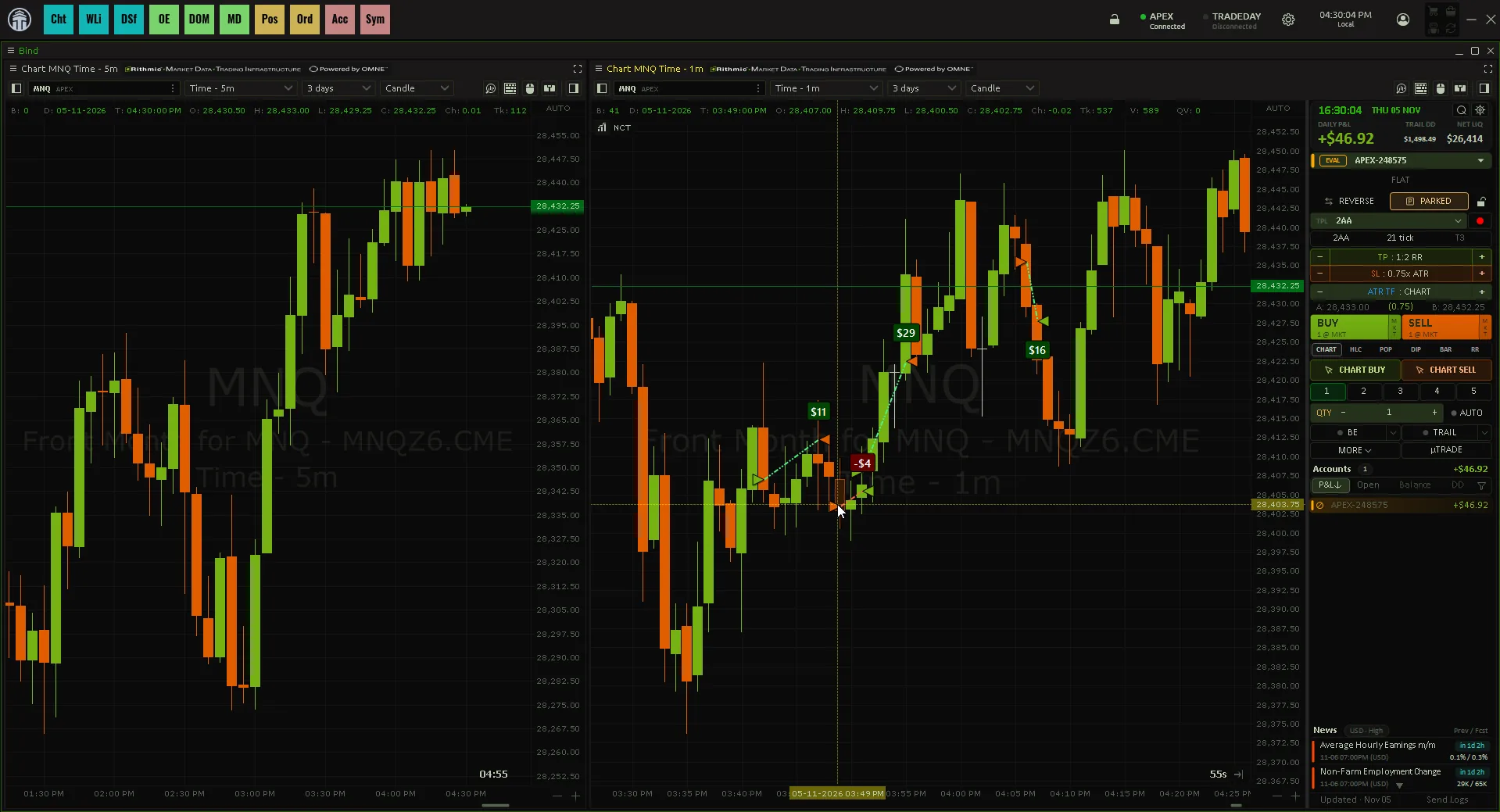
Things to notice:
- A template is the whole setup. It saves stop and target modes and values, quantity and AUTO sizing, the ATR timeframe, Multi TP levels, breakeven settings and trailing settings.
- T1 to T3 are per instrument. Your ES templates and your CL templates can sit on the same three buttons.
- The orders are the panel's own. Nexus places the stop as a stop order and the target as a limit order, and keeps both sized to the position as you add or scale out.
Keep Quantower running
Breakeven moves and trailing are done by the add-on, so they only happen while Quantower is open and connected. Quantower's own Local SL/TP strategy has the same limit.
When not to buy an add-on
If your NinjaTrader ATM was just a fixed stop and target, a Quantower order template covers it. You need more when the ATM also moved the stop for you. Related: Quantower bracket orders and auto breakeven in Quantower.
ATM-style templates for Quantower
Save your stop, targets, breakeven and trailing rules once in Nexus Chart Trader's Template Manager, then recall them in one click.
See Nexus Chart Trader for QuantowerNexus Indicator
Published by Nexus Indicator. Nexus sells Nexus Chart Trader for Quantower, which this article mentions. For product, licensing, or setup questions, contact support.