
Hide & Restore
Temporarily simplify the chart, then bring an indicator back when it becomes relevant.
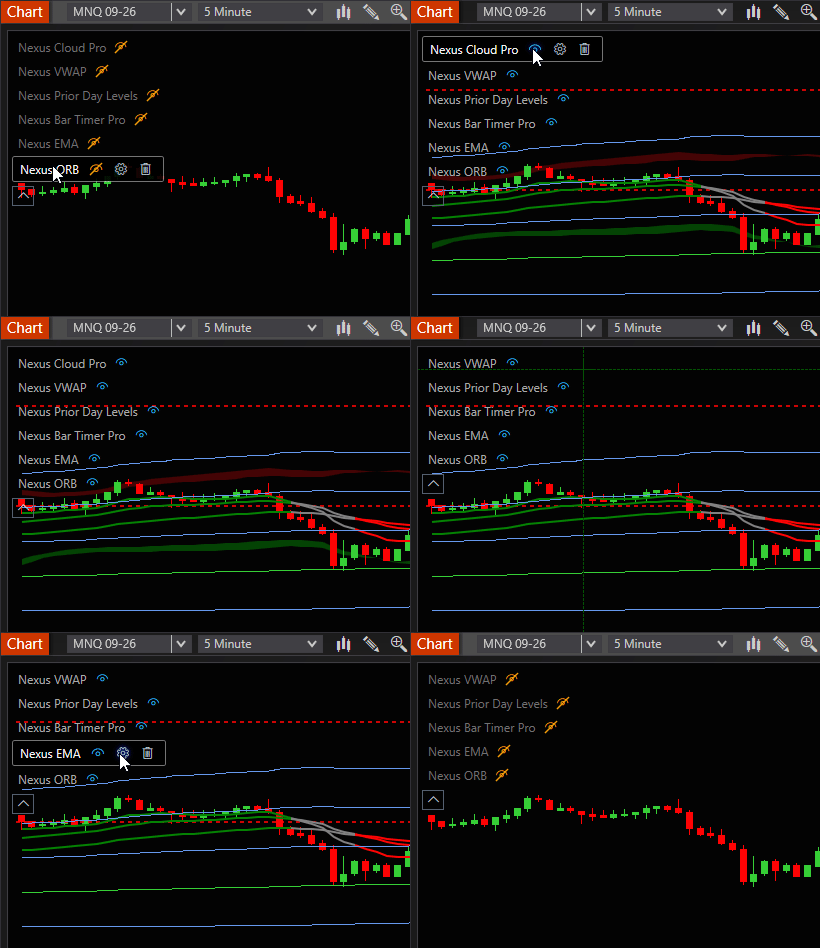
NinjaTrader indicator manager add-on
This NinjaTrader indicator manager add-on turns a crowded chart into a clear, manageable workspace. Review configured indicators, then hide, restore, open settings, or remove an item without hunting through the chart.
A clearer chart workflow
The panel is built for the moments when a chart has become difficult to read, not for adding another complicated layer to it.
Review the indicators on the current chart in one compact list instead of scanning labels and lines across the workspace.
Hide an indicator for a cleaner view, restore it later, open its settings, or remove an item you no longer want on the chart.
Collapse the panel when you are done and keep the chart focused on the information that matters right now.
What you can manage
Nexus Indicator List is deliberately focused: it helps you organize an active chart without asking you to leave it.
Temporarily simplify the chart, then bring an indicator back when it becomes relevant.
Go directly to an indicator’s configuration workflow from the panel.
Clear out an indicator that no longer belongs in the current chart setup.
Adjust the panel position and visual presence to suit the way you arrange your charts.
One-time payment. Lifetime access and every future update included.
Pay once · lifetime updates · no subscription
Enter your NinjaTrader Machine ID at checkout for activation.
Questions? Contact us.
It adds a compact panel to your NinjaTrader 8 chart so you can review and manage the indicators configured on that chart from one place.
Yes. Hide an indicator when you want a cleaner chart, then restore it later from the same panel.
After purchase, download the ZIP from your Nexus download area. In NinjaTrader 8, select Tools > Import > NinjaScript Add-On, then select the ZIP file. See the installation guide for help.