
The Ultimate
NinjaTrader 8
Chart Trader
The all-in-one cockpit for NinjaTrader 8. Engineered for speed and precision, combining automated prop firm account management with intelligent one-click chart trading to enforce discipline and elevate your performance.
Nexus Chart Trader: Key Features
An advanced NT8 Trade Panel engineered for speed, visual precision, and prop firm risk management.
Smart Rotation & Account Parking
Master multiple Prop Firm accounts (Apex, Topstep, etc.) without the need for a trade copier.
- Smart Account Rotation: Automatically cycles to the next eligible account after every trade entry, ensuring you spread risk evenly across your portfolio.
- Manual Account Parking: Hit a target or feeling choppy on a specific account? Click "Park Account" to instantly skip it in the rotation for the rest of the session.
- Global Lock on Loss: Prevent revenge trading. If you take a bad loss, the system can automatically lock ALL accounts for a set cooldown period (e.g., 10 minutes).
Visual Trading & Momentum Entries
Stop calculating lots in your head. Plan your trade on the chart and execute instantly.
- Drag-and-Drop Visual Tool: Click to spawn Entry, Stop, and Target lines on the chart. Adjust your Risk/Reward visually, and the panel auto-calculates the contract size based on your $ risk.
- POP & Trigger Entries: Specialized buttons to place Buy/Sell stops X ticks away from the market to catch momentum breakouts.
- Execution Markers: Beautiful, clean entry and exit arrows with PnL labels drawn directly on your chart history.
Automated Risk & Management
Advanced trade management features that go far beyond standard ATM strategies.
- Dynamic Dollar Risk: Input your risk (e.g., $150). The panel dynamically adjusts position size based on your Stop Loss width.
- ATR Trailing & Auto-BE: Trail your stop loss based on market volatility (ATR) or fixed ticks, and auto-move to Breakeven to secure free trades.
- News & Schedule Lock: Automatically prevents trading during high-impact news events (CPI, FOMC) or outside your specific trading hours.
DCA Scaling & Multi-Mode TP/SL
Go beyond simple fixed-tick brackets. Choose from 5 take-profit and 6 stop-loss calculation modes, and scale into positions with intelligent DCA.
- 5 Take-Profit Modes: Fixed Ticks, Points, Dollar Amount, ATR Multiplier, or Risk/Reward Ratio — each auto-calculates your exit.
- 6 Stop-Loss Modes: Fixed Dollar, Ticks, Points, ATR-Based, Dynamic ATR-Tiered, or Previous Candle — pick the method that matches your strategy.
- DCA Entries: Scale into positions on a single account or across multiple accounts with Smart Rotation DCA. Brackets auto-recalculate on every add.
- TP/SL Templates (T1/T2/T3): Save your favorite TP + SL configurations as one-click presets. Hold to record, tap to apply instantly.
Take Profit Modes
- ✦ Fixed Ticks
- ✦ Dollar Amount
- ✦ Points
- ✦ ATR Multiplier
- ✦ Risk/Reward Ratio
- ✦ Dynamic ATR-Tiered
Stop Loss Modes
- ✦ Fixed Dollar Risk
- ✦ Fixed Ticks
- ✦ Points
- ✦ ATR-Based
- ✦ Previous Candle
Multi-Timeframe ATR
Chart · 1M · 5M · 15M · 1H · 4H · Daily
How Indicator Attachment Works
Works with any NinjaTrader indicator that has a visible plot on the chart.
Indicator Attachment System
A feature no other NinjaTrader tool offers. Tether your TP or SL directly to any indicator plot on your chart — your orders move in real-time as the indicator updates.
- Attach SL to an EMA: Your stop follows the moving average as it curves — no manual adjustment needed.
- Attach TP to a Resistance Level: Target automatically tracks key levels plotted by any indicator.
- Smart Safety: Auto-detaches when Auto-BE or Trailing Stop triggers, so automation always takes priority.
Hotkeys, Streamer Mode & More
Speed, privacy, and professional workflow tools built for daily execution.
- 12+ Configurable Hotkeys: Buy, Sell, Close, Next/Prev Account, TP Up/Down, Flatten All (Shift+F), Breakeven (Shift+B), Instrument Switch, and more.
- Streamer Mode: 3-level privacy toggle — full account names, abbreviated, or redacted digits. Stream on YouTube/Twitch without exposing your accounts.
- Micro/Full Instrument Switch: Toggle between ES↔MES, NQ↔MNQ, YM↔MYM with a single key press.
- 3 Themes: Dark, Light, and Midnight — every element fully themed. One-click cycle with the theme toggle button.
Hotkey Quick Reference
Theme
🌙 ☀️ 🌃
Dark · Light · Midnight
Streamer
👁️
Full · Short · Redacted
Prop Firm Rule Compliance, Automated.
Every risk control maps directly to the rules enforced by Apex, Topstep, MyFundedFutures, and other major prop firms. Stop violating rules manually — let the software enforce them.
Daily Loss Limit
Separate thresholds for Pro and Eval accounts. Auto-flattens and locks the account for the session when the limit is hit. Locks survive app restarts via Windows Registry.
Daily Profit Target
Lock in profits automatically. When your daily PnL hits your configured target, all positions are flattened and the account is locked — no temptation to give it back.
Trailing Drawdown
Tracks your peak Net Liquidation value and auto-flattens if drawdown from peak exceeds your limit — exactly how prop firms calculate it.
Profit Protector
Activates after hitting a profit milestone. Set a hard floor or trailing percentage — if profit drops below your threshold, positions are flattened automatically.
Max Position Size
Prevents position exceeding your configured maximum. If you somehow go over (DCA, partial fill, etc.), excess contracts are auto-trimmed via market order.
Auto-Close Before Market Close
Automatically flattens all positions X minutes before session end. No more forgetting to close before the deadline — configurable from 1 to 60 minutes.
Everything Else You Get
Over 100 configurable settings. Here are the highlights.
On-Chart Position Pill
Interactive entry-price capsule with TP/SL/BE/Trail/Close buttons and 3 PnL display modes (Currency, Ticks, Points).
Order Dragging
Drag any pending order directly on the chart. Price snaps to tick size. 4K DPI-aware hit detection.
Execution Markers
FIFO-matched trade arrows with colored connectors and PnL labels. 4 detail levels. Pin and hover to inspect.
Global Loss Cooldown
After consecutive losses, ALL accounts lock for a configurable period (5 min – full session). Prevents revenge trading.
PnL Dashboard
Real-time per-account view: Realized PnL, Unrealized PnL, Net Liquidation, Daily Return %. Color-coded by account type.
Click-to-Trade + OCO
Click directly on the chart to place limit or stop orders. Optional OCO brackets automatically link entry pairs.
5 Smart Rotation Priorities
Evals First, Pros First, Fewest Trades, Lowest Balance, or Highest Balance — pick your rotation strategy.
Order Label Modes
4-state toggle: hidden → qty only → qty + price → full details. Collision-avoiding label positioning.
Order Timeout
Auto-cancel unfilled limit orders after 3 seconds to 10 minutes. No more stale orders sitting on your book.
Position Reverse
One-click position flip — flatten current side and re-enter opposite direction in a single action.
OBS Recording Trigger
Writes START/STOP trigger files for OBS or other capture tools. Auto-starts on entry, stops on close.
API Rate Limiter
Throttles order modifications to ~80/min to prevent broker 429 errors during rapid bracket adjustments.
Complete Your Toolkit: The Nexus Trading Journal
While Nexus Chart Trader perfects your execution, the Nexus Trading Journal perfects your analysis. This fully automated standalone indicator captures every trade you make, providing the objective feedback you need to refine your strategy.
Learn More About the Journal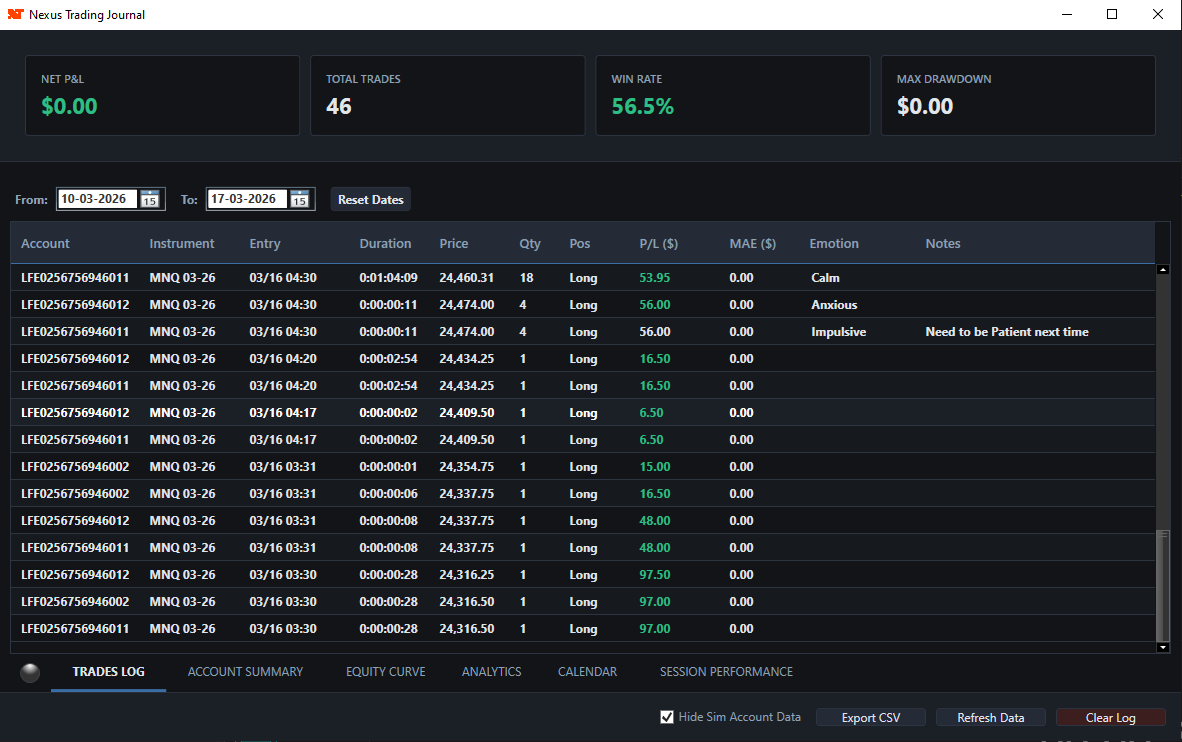
Frequently Asked Questions
Does Nexus Chart Trader work as a Prop Firm Copier?
Nexus Chart Trader includes intelligent account rotation, which is often preferred by prop firms over simultaneous copying to avoid "group trading" flags. However, we also offer a free Nexus Copier for standard trade copying needs.
Can I use this for Apex Trader Funding accounts?
Absolutely. Nexus Chart Trader is optimized for Apex Trader Funding, Topstep, MyFundedFutures, and other major prop firms using Rithmic or Tradovate connections within NinjaTrader 8. It auto-detects account types (Pro, Eval, Sim) and applies the correct risk settings for each.
Does it work with Tradovate and Rithmic connections?
Yes. Nexus Chart Trader works with any connection type supported by NinjaTrader 8, including Rithmic, Tradovate, and CQG. The built-in API rate limiter also prevents 429 errors during rapid bracket adjustments on Rithmic.
Can I use it on multiple computers?
Each license is tied to a single NinjaTrader Machine ID (found in Help > About). If you need to transfer your license to a different machine, contact us and we'll re-activate it for you at no cost.
Does it conflict with NinjaTrader's built-in ATM strategies?
Nexus Chart Trader replaces ATM strategies entirely with a more powerful bracket management system. You should disable ATMs when using Nexus to avoid duplicate orders. Nexus handles all TP, SL, trailing, and breakeven logic internally.
What risk protections survive a NinjaTrader crash or restart?
Daily risk locks are persisted to the Windows Registry, so they survive app crashes, restarts, and reconnections. Your accounts stay locked until the session boundary clears them — even if NinjaTrader goes down.
What's the difference between Monthly and Lifetime?
Both plans include the full Nexus Chart Trader with every feature — all TP/SL modes, risk manager, rotation, steppers, hotkeys, everything. The only difference is billing: monthly subscription vs. one-time payment. Lifetime also includes priority support and all future updates forever.
How does the Indicator Attachment system work?
Click the attach button (🔗) on any TP or SL order, then hover over an indicator plot on your chart (EMA, SuperTrend, Levels, etc.) and click to attach. Your order will automatically follow that indicator's value in real-time. Works with any NinjaTrader indicator that has a visible plot.
Refine Your Execution edge.
Stop fighting the platform and start trading with institutional discipline.
$599
No recurring payments
- All Features Included
- Lifetime Updates Forever
- Priority Support
- One-Time Payment
- Pay ~6 Months, Keep Forever
$99
/mo- All Features Included
- Smart Rotation & Risk Manager
- Auto-BE & Trailing Engine
- Updates While Subscribed
- Cancel Anytime
After payment, please email info@nexusindicator.com with your transaction details and your NinjaTrader Machine ID (found in Help > About) for license activation.
Instant Activation. Priority Support.
Have questions before you purchase? Contact us.
Get Started with NinjaTrader & Free Data
NinjaTrader is always free for advanced charting, backtesting, and simulation. Get started with free EOD data from Kinetick.

