NinjaTrader trade copier add-on
Copy Trades Between
NinjaTrader 8 Accounts
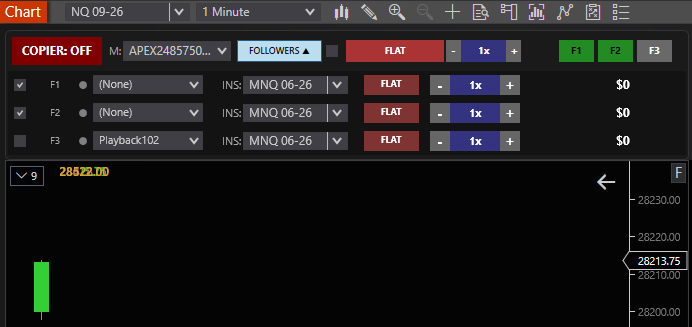
A NinjaTrader trade copier add-on. Trade on one master account. Nexus Copier copies supported entries, exits, and stop-loss/take-profit bracket changes to up to three enabled follower accounts.

Master → Follower Order Copying
Set your master account, pick followers, and trade normally. The copier handles replication in the background.
Connect accounts
Choose one master and up to three follower accounts inside NinjaTrader 8. Settings persist across restarts.
Trade the master
Supported entries, exits, and bracket changes on the master are copied to each enabled follower.
Scale with confidence
Monitor enabled followers and apply the license limits while orders are copied from the master.
Follower Order Controls
Designed to keep supported entries, exits, and bracket changes coordinated across enabled followers.
Follower State
Tracks the enabled follower accounts selected for copying.
Trade Lifecycle
Tracks copied entries, exits, and supported order changes through the trade lifecycle.
Bracket Sync
Copies supported stop-loss and take-profit changes to enabled followers.
Saved Settings
Account selections, ratios, and copier settings restore after NT8 restarts.
Account Mapping and Bracket Synchronization
Know what is selected, what is copied, and what still depends on the follower account before enabling live copying.
Set up the copy relationship
- 1.Choose one master account and add the follower accounts that should receive supported orders.
- 2.Select the follower instrument and quantity ratio. Enable only the followers intended for the session.
- 3.Use the instrument sync control when the master and follower should use a supported full-size or micro contract pair.
- 4.Test the complete entry, stop, target, adjustment, and exit workflow in Sim before using a live or evaluation account.
Built-in full-size ↔ micro pairs
The current copier includes these symbol mappings:
ES ↔ MES · NQ ↔ MNQ · YM ↔ MYM · RTY ↔ M2K · CL ↔ MCL · GC ↔ MGC · SI ↔ SIL · 6E ↔ M6E · 6B ↔ M6B · 6J ↔ M6J · 6A ↔ M6A · 6C ↔ M6C · 6S ↔ M6S · NG ↔ MNG · BTC ↔ MBT · ETH ↔ MET
Contract availability and symbol definitions can change. Confirm the intended instrument is available on every selected account before copying.
What bracket sync means
Supported master entries, exits, stop-loss orders, profit targets, and supported changes are submitted separately to each enabled follower. It does not guarantee identical fill prices or timing. Slippage, rejected orders, connection state, broker handling, and provider rules can produce different follower results, so every account should still be monitored in NinjaTrader and at the broker.
Simple, Transparent Copier Pricing
One-time license. Lifetime updates. No monthly subscription.
Nexus Copier
Standard Edition
$20 one-time
- Up to 3 follower accounts
- 30 max contracts per follower
- Market, limit and stop order copying
- Copied exits and SL/TP bracket changes
- No account type filtering
- No follower grouping
Pro Edition
Nexus Copier Pro
$299 one-time
Lifetime license & updates. No subscription.
Everything in Standard, plus
- More follower accounts than Standard
- Up to 200 contracts per copied trade
- Multi-broker & cross-connection copying
- Account type filtering (Pro, Eval, Sim)
- Follower account grouping & custom ratios
- Priority lifetime updates & support
Questions before you buy? Contact us.
Common Nexus Copier Workflows
Trade copiers solve a specific problem: you make decisions once on a master account and need the same supported orders on additional NT8 connections without re-clicking every follower. That is different from account rotation, where execution moves between accounts over time. If you need rotation or firm-wide risk locks, Nexus Chart Trader is the better fit; Copier is for broadcast-style replication.
Retail traders often start with Standard ($20) when they run one personal account plus a small set of evaluation or funded followers—up to three enabled accounts with contract caps per follower. You still trade the master manually; the copier mirrors supported market, limit, and stop entries, exits, and bracket adjustments you place on that master.
Copier Pro ($299) is aimed at heavier topologies: more followers, larger per-trade contract limits, cross-connection copying when your NT8 workspace already has multiple broker adapters, follower grouping, and emergency flatten controls. Even with Pro, fills are not guaranteed to match tick-for-tick; connection health, instrument availability, and broker rules can diverge, so each follower remains your responsibility to monitor.
Regardless of edition, run a full Sim rehearsal before enabling copying on evaluation or funded accounts. Walk through entry, partial exit, stop/target drag, and flat-all scenarios. Confirm micro mapping if you scale a full-size master into micro followers, and verify that every symbol exists on every connection you enable.
Frequently Asked Questions
What is the difference between Nexus Copier Standard ($20) and Nexus Copier Pro ($299)?
Nexus Copier Standard ($20 one-time) is designed for individual retail traders copying a single master account to up to 3 follower accounts with up to 30 contracts per follower and full bracket synchronization. Nexus Copier Pro ($299 one-time) is an enterprise-grade execution engine supporting unlimited follower accounts, up to 200 contracts per copied trade, cross-broker and multi-connection copying (Tradovate, Rithmic, CQG, Interactive Brokers), Account Type Filtering (Pro/Funded, Evaluation, Sim), follower grouping & ratio multipliers, cross-instrument mapping, and emergency Flatten All controls. Both editions are 100% lifetime licenses with zero recurring monthly subscriptions.
How does sub-millisecond local order replication work without cloud latency?
Nexus Copier executes entirely within the local NinjaTrader 8 NinjaScript runtime using a dedicated high-resolution inter-process event bus. Because orders are mirrored in-memory directly through NinjaTrader's native execution API without routing through external third-party servers, webhooks, or cloud relays, latency is sub-millisecond (virtually zero added delay), eliminating slippage risks during fast-moving economic news.
Can I copy trades across different brokers and multi-broker connections?
Yes. With Nexus Copier Pro, you can bridge trades across multiple active NinjaTrader 8 connections simultaneously. For example, you can execute orders on a primary Rithmic or Tradovate master account and instantly mirror them across secondary Rithmic, CQG, Apex, Topstep, Interactive Brokers, or NinjaTrader Continuum accounts in real time.
Does Nexus Copier support mini-to-micro contract mapping and custom quantity ratios?
Yes. Nexus Copier features built-in contract ratio multipliers and automatic full-size to micro instrument mapping (such as ES to MES, NQ to MNQ, YM to MYM, RTY to M2K, CL to MCL, GC to MGC, and 6E to M6E). You can configure individual follower accounts with custom quantity ratios (e.g., 1 ES contract on master = 10 MES or 2 MES on a follower) to manage varying account sizes and risk parameters accurately.
How are Stop-Loss, Take-Profit, and trailing bracket orders synchronized?
Nexus Copier tracks bracket orders independently using dedicated order identifiers. When you submit, modify, or drag your Stop-Loss or Take-Profit orders on the master chart, the copier immediately dispatches corresponding amendment orders to all follower accounts. If the master position is closed, partially scaled out, or hit by a stop/target, follower bracket orders are instantly updated or cancelled to prevent orphaned orders.
Can I copy trades in reverse or invert positions (Inverted Copying)?
Yes. In Nexus Copier Pro, you can configure individual follower accounts to copy in Reverse/Inverted mode. When the master account executes a Buy/Long order, the inverted follower account automatically executes a Sell/Short order with inverted Stop-Loss and Take-Profit brackets, which is ideal for hedging strategies or counter-trend portfolio balancing.
How does Account Type Filtering work (Funded/Pro vs. Evaluation vs. Sim)?
Copier Pro includes intelligent Account Type Filtering that automatically detects whether an account is a Live/Funded (PA/Pro), Evaluation (Combine/Challenge), or Simulation account. You can enable or disable copying selectively based on account classification, ensuring you never accidentally mirror high-risk evaluation trades into your funded personal or PA accounts.
Can I create Follower Groups and dedicated allocation profiles?
Yes. Copier Pro supports follower grouping and custom account sets. Traders managing multiple prop firm accounts (such as 5 Apex accounts and 5 Topstep accounts) can assign them into distinct groups, toggle entire sets on or off with a single click, and apply distinct risk sizing to each group without reconfiguring accounts individually.
What emergency controls and Flatten All features are included?
Nexus Copier includes an instant one-click Emergency Flatten All function directly on the user interface. Clicking Flatten All immediately liquidates all open market positions and cancels all working limit and stop orders across the master account and every active follower account simultaneously, providing complete safety during sudden market turbulence.
How does the built-in Circuit Breaker protect accounts against broker disconnects and rate limits?
To protect traders from broker API throttling and rate-limit disconnects during high-frequency volatility, Nexus Copier incorporates an intelligent circuit breaker and order throttling mechanism. If broker rejections, network drops, or claim timeouts occur, the circuit breaker halts automated transmissions and alerts the trader immediately rather than flooding the connection with repeated rejected orders.
What happens if NinjaTrader 8 disconnects or crashes mid-trade?
Nexus Copier features an integrated state reconciliation engine. Upon reconnection, the copier checks positions and open working brackets against expected states. If a discrepancy is detected, you can perform manual or automatic position realignment to ensure follower accounts remain perfectly synchronized with your trading plan.
Is Nexus Copier compliant with prop firm evaluation and funded account rules?
Nexus Copier operates as a standard local NinjaScript add-on directly inside your authorized NinjaTrader 8 workstation. Major futures prop firms (including Apex Trader Funding, Topstep, MyFundedFutures, TradeDay, and Fast Track Trading) permit trade copiers executed locally on the trader's own computer. Always review your specific firm's maximum contract limits and consistency rules in our Prop Firm Comparison guide.
Is the license a one-time payment or a recurring monthly subscription?
Nexus Copier (Standard $20 and Pro $299) is strictly a one-time lifetime license. There are zero monthly fees, zero per-account surcharges, and zero recurring renewals. Your license is linked to your NinjaTrader 8 Machine ID and includes all future updates. Machine ID transfers to a new PC are supported seamlessly through our automated customer portal.
How do I install and configure Nexus Copier in NinjaTrader 8?
Installation takes less than 60 seconds and requires zero coding. Download the .zip file from your purchase receipt, open NinjaTrader 8, navigate to Tools > Import > NinjaScript Add-On..., and select the zip file. Once imported, open any chart or the Control Center, add Nexus Copier from the Add-Ons menu, select your Master and Follower accounts, and click Enable. Detailed visual steps are available in our Installation Guide.