NinjaTrader data backup add-on
Download, Back Up & Restore Market Data
for NinjaTrader 8
This NinjaTrader data backup add-on handles Tick, Minute, Daily, and Market Replay data for whole instrument lists in one run. Create portable backups, then add the Nexus Replay Restore desktop app when you need Market Replay restoration.

Your Historical Data, Made Simple
Four Data Types
Download Tick, Minute, Daily, and Market Replay data in any combination.
Large Instrument Lists
Add futures and other NinjaTrader instruments, or import a TXT or CSV list.
Portable Backups
Save selected instruments, dates, and data types together in one backup.
Complete Restore
Restore historical data in the add-on and add Market Replay restoration for $49.
One Toolkit for Your Historical Data
Download, organize, back up, and restore data without processing every instrument and file one at a time.
One-Click Bulk Downloads
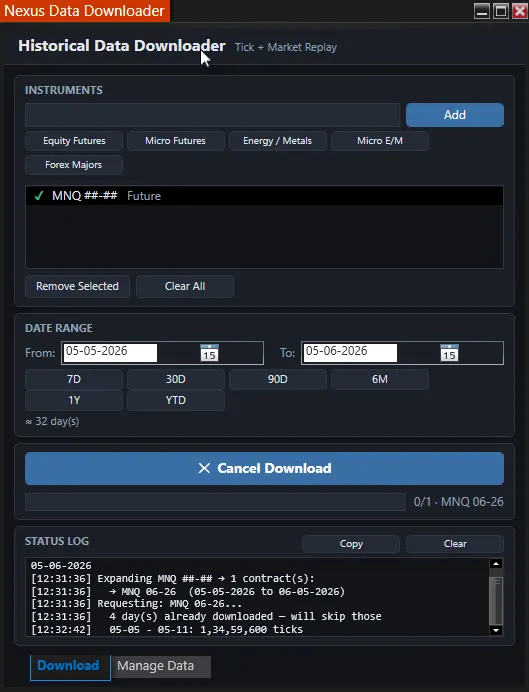
Queue a whole watchlist and download Tick, Minute, Daily, and Market Replay data across a chosen date range in one run.
Smart Contract Expansion
Enter a continuous futures symbol and the correct dated contracts for your date range are selected automatically. You never have to track which contract was active when.
Futures and More
Use instruments recognized by NinjaTrader, including large lists imported from TXT or CSV files. Available history depends on your data provider and instrument type.
Quick-Add Presets
One-tap groups for Equity Futures, Micro Futures, Energy/Metals, Micro E-minis, and Forex Majors.
Flexible Date Selection
From/To date pickers plus quick-range buttons (7D, 30D, 90D, 6M, 1Y, YTD) and a live day-count readout.
Resume-Friendly Smart Skip
Detects data already on disk and skips it, so re-runs only fetch what's missing instead of re-downloading gigabytes.
Live Progress & Reliable Downloads
Per-instrument progress you can watch in real time, automatic recovery from transient failures, and a cancel button at any time.
Clear Status Updates
Follow each download with simple progress messages and clear notices when data is unavailable.
Built-In Data Management
See how much space each instrument uses across Tick, Minute, Daily, and Market Replay data, then remove selected data when needed.
Bulk Data Backups
Create one portable backup for selected instruments, dates, and data types without downloading everything again.
Restore Historical Data
Restore Tick, Minute, and Daily data for multiple instruments in one step. Available Bid/Ask information is kept with Tick data.
Replay Restore Add-On
For $49, add a guided Windows desktop app that restores Market Replay data from a Nexus backup after NinjaTrader is closed.
How It Works
Build, back up, and restore your NinjaTrader historical-data library in five straightforward steps.
Open it from the Control Center
In NinjaTrader, go to Control Center → New → Nexus Data Downloader.
Add your instruments
Type symbols, tap a preset, or import a TXT or CSV list. Nexus checks each instrument before starting.
Choose dates and data types
Select any combination of Tick, Minute, Daily, and Market Replay data for your date range.
Download everything in one run
Follow the progress while Nexus downloads each instrument. Data you already have is skipped automatically.
Back up or restore when needed
Create one portable Nexus backup. Restore Tick, Minute, and Daily data in the add-on, or use the optional Replay Restore add-on for Market Replay.
What a Nexus backup contains
The portable backup contains the instruments, dates, and supported historical-data types selected in Nexus Data Downloader. It is not a backup of NinjaTrader workspaces, charts, strategies, account settings, or licences.
Restore requirements
Tick, Minute, and Daily data restore inside the add-on. Market Replay restore requires the optional Windows app and NinjaTrader must be closed. Verify the restored dates before removing any original data or backup.
Choose What You Need
Start with Nexus Data Downloader. Add Market Replay restoration whenever you need it.
Nexus Data Downloader
NinjaTrader 8 add-on · lifetime updates · no subscription
- Bulk Tick, Minute, Daily & Market Replay downloads
- Portable backups for multiple instruments and dates
- Bulk Tick, Minute & Daily data restore
- Built-in data management
- Lifetime access & future updates included
Secure checkout via PayPal · instant license activation
Nexus Replay Restore
Direct Windows EXE download · lifetime updates · no subscription
- Restores Market Replay from a Nexus backup
- Guides you through closing NinjaTrader safely
- Protects existing Replay data before restoring
- Requires a Nexus Data Downloader backup
- Lifetime access & future updates included
This add-on restores Market Replay data from backups created by Nexus Data Downloader.
Have questions before you purchase? Contact us.
Frequently Asked Questions
What does the Nexus Data Downloader do?
It downloads Tick, Minute, Daily, and Market Replay data for multiple instruments in one run. It also creates portable backups and restores Tick, Minute, and Daily data inside NinjaTrader. Market Replay restoration is available through the optional desktop add-on.
How much is Nexus Replay Restore?
Nexus Replay Restore is an optional $49 one-time add-on. It requires a backup created by Nexus Data Downloader and restores the Market Replay data in that backup after NinjaTrader is closed.
How do backups and restores work?
Choose your instruments, dates, and data types to create one portable Nexus backup. Restore Tick, Minute, and Daily data from the add-on. For Market Replay, close NinjaTrader and use the optional Replay Restore add-on.
Does it keep Bid/Ask information?
Yes, when your data provider supplies it. Nexus keeps the available Bid/Ask information with Tick data through backup and restore. It does not create missing Bid/Ask values.
Do I need to know which contract was active for a given date?
No. Enter a continuous futures symbol and the downloader automatically selects the correct dated contracts across your date range, so you never have to track which contract was active when.
Will it re-download data I already have?
No. The resume-friendly smart skip detects data already on disk and skips it, so re-runs only fetch what's missing instead of re-downloading gigabytes.
What are the requirements?
NinjaTrader 8 on Windows and a data connection that supplies the history you request. Available data depends on your provider, subscription, exchange permissions, and symbol coverage.
Is this a one-time payment?
Yes. Nexus Data Downloader is $99 one-time, and the optional Nexus Replay Restore desktop app is $49 one-time. Both include future updates and have no subscription.
Enhance Your Trading with Nexus Tools
Combine the Data Downloader with the rest of the Nexus toolkit for a complete workflow.
Nexus Chart Trader
One-click entries, dollar-risk sizing, auto-breakeven, and durable daily risk locks, the execution layer for the data you export here.
Trading Journal
Automate trade logging and get detailed performance analytics on the data you backtest with.
Nexus SuperTrend
An adaptive ATR trend engine to test against all that fresh historical data.