NinjaTrader 8 guide · Reviewed September 17, 2026
NinjaTrader position sizing from dollar risk
Position sizing converts a planned dollar risk and an entry-to-stop distance into a contract quantity. The Nexus Chart Trader add-on brings that calculation into NinjaTrader 8, alongside visual risk/reward planning and order execution.
The essential calculation is contracts = floor(dollar risk ÷ risk per contract). For futures, risk per contract is the stop distance in ticks multiplied by the instrument's dollar value per tick. Round down; rounding up exceeds the stated budget before costs.
Try the risk calculationSee visual trade planningCalculate quantity from the stop, not from a habit
A fixed quantity creates different planned dollar exposure when the stop distance changes. If a stop doubles in distance and quantity stays unchanged, the entry-to-stop exposure doubles. Keeping the dollar budget fixed requires recalculating quantity for each setup.
Use the correct instrument specifications. A mini and its micro counterpart do not have the same dollar value per tick. A price distance in points is also not necessarily the number of ticks. Check the instrument's tick size and tick value before doing the calculation.
A worked example
Suppose the chosen risk budget is $150, the stop is 20 ticks away and each tick is worth $1.25 per contract. One contract has $25 of planned entry-to-stop exposure. $150 ÷ $25 gives six contracts before costs. If the stop widens to 40 ticks, the same calculation gives three contracts.
These are illustrative inputs, not a suggested trade, instrument or risk budget. Commissions and slippage are additional unless explicitly included in your calculation.
Position size calculator
This educational calculator shows the arithmetic. It does not connect to NinjaTrader or place orders. Enter your own verified instrument values and an optional per-contract allowance for costs.
How the native Chart Trader workflow differs
The standard Chart Trader panel lets you select quantity and submit orders from the chart. ATM strategies can manage attached stops and targets. Selecting an ATM template does not by itself calculate a fresh quantity from a dollar budget and the stop you have just planned.
You can calculate quantity separately and enter it manually. A chart-integrated sizing tool is useful when you want the planned stop distance and order quantity in the same workflow. Compare the native Chart Trader and Nexus execution workflows before deciding whether an add-on is necessary.
Use dollar-risk sizing with Nexus Chart Trader
- Select the correct account and instrument. Check both before building the order. Account labels and available buying power do not replace a risk budget.
- Plan the entry and stop. Use the visual risk/reward tool to inspect the levels and the planned relationship between risk and reward.
- Choose the dollar-risk sizing configuration. Nexus uses the instrument and planned stop distance to calculate quantity. Review maximum-contract settings as a separate constraint.
- Review the final quantity before entry. Recheck after moving levels or changing instruments. A stop modification after entry changes exposure; a prior quantity calculation is not a promise that exposure stays fixed.
- Manage the trade. Multi-target exits, break-even and trailing-stop controls manage the position after entry. They complement sizing rather than replacing it.
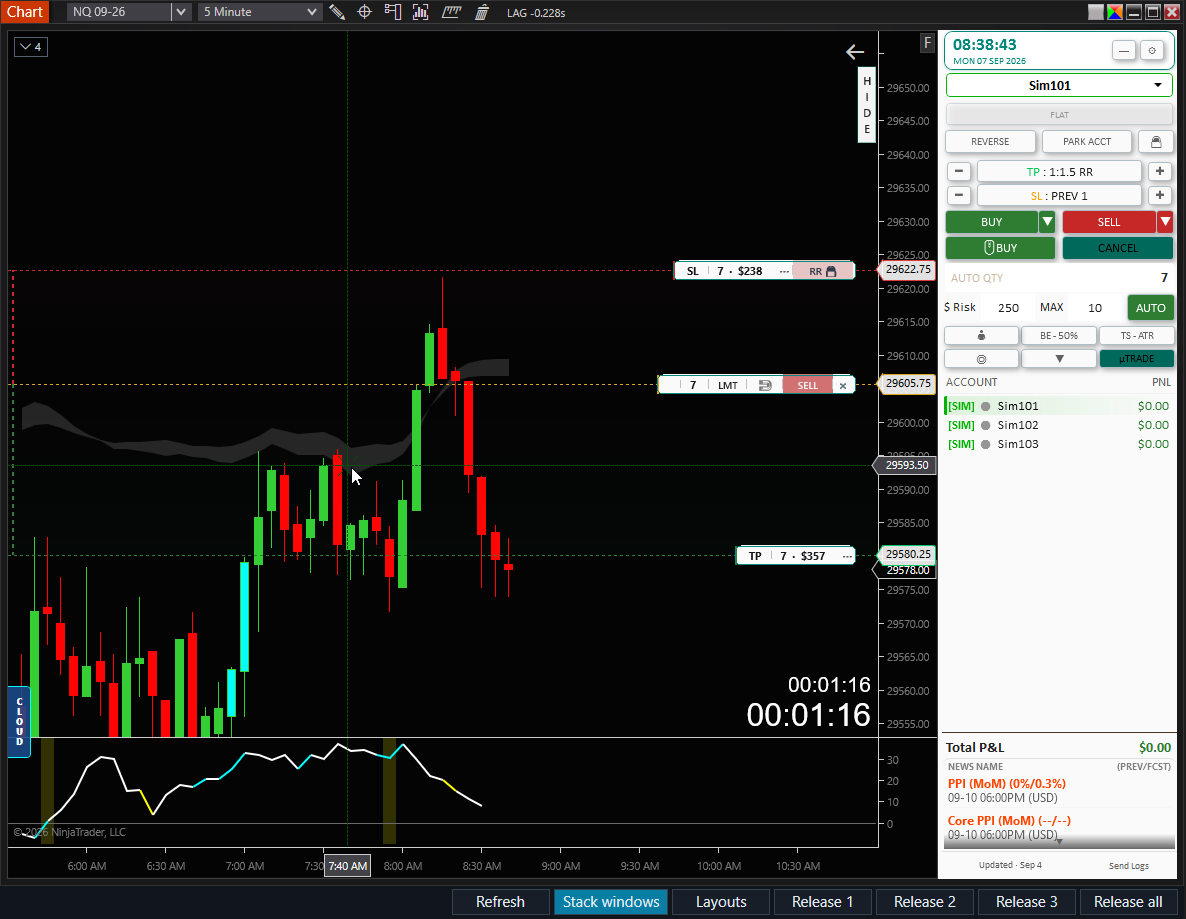
Maximum contracts and maximum risk solve different problems
A contract ceiling limits quantity. A dollar-risk budget also depends on stop distance and tick value. Two contracts with a wide stop can represent more planned exposure than four contracts with a narrow stop. Apply the quantity ceiling and dollar-risk check together when that is your intended rule.
Nexus includes maximum-position controls as well as sizing. Review the distinction between limiting a proposed entry and handling an oversized position already open. A position-size limit is not a maximum-trades-per-day setting, and reducing an open position still requires an order to execute.
For evaluation and funded accounts, compare the planned exposure with the account's actual remaining risk room. The account's headline size is not its remaining drawdown allowance. The trailing-drawdown explanation shows why an open profit can change that room.
Checks that prevent common sizing errors
- Keep ticks, points and dollars distinct. Convert point distance using the instrument's tick size.
- Use the correct tick value for the exact contract, especially when switching between minis and micros.
- Round down and handle a zero-contract result explicitly instead of forcing one contract.
- Account for costs and possible adverse fills. Planned stop exposure is not a guaranteed maximum loss.
- Recheck quantity after changing the stop or instrument, and check aggregate exposure when adding to a position.
Position-sizing questions
Can I use fixed-dollar risk with multiple profit targets?
Plan the total entry quantity from the stop and risk budget first, then allocate that quantity across targets. Targets determine how you scale out; their distance does not reduce the initial stop exposure.
Does moving to break-even guarantee a loss-free trade?
No. Costs, gaps and order execution still matter. Break-even is an order-management instruction, not a guaranteed net result.
Does sizing enforce a daily loss limit?
No. It addresses the next trade's planned exposure. A daily rule monitors the session or account. Use the daily loss limit guide for that separate control.
Plan the risk and execute from the same chart
Dollar-risk sizing and visual planning are included in Nexus Chart Trader, along with account risk controls, multi-target management and advanced chart execution.
See the product and demonstrations