Platform Comparison
NinjaTrader Trade Copiers Compared: Which Type Fits Your Accounts?
Trade one NinjaTrader 8 account and have the same orders appear on your others. That is what a NinjaTrader trade copier does, and there are four ways to get one. Here is the short version.
Option 1
NinjaTrader 8 alone
Free, but no copier- NT8 has no built-in trade copier
- It can connect to several brokers at once, which copiers use
Best for: nobody who needs copying. You will need an add-on.
Option 2
Local add-on copier
From $20 one-time- Runs inside NT8 on your PC
- One master account, followers copy it
- No monthly fee
Best for: most traders copying their own accounts. Nexus Copier
Option 3
Copying built into your order panel
$299/yr or $599 lifetime- Copy from the chart panel you already trade from
- Also gives order entry, sizing and loss locks
Best for: traders who want a full trading panel anyway. Nexus Chart Trader
Option 4
Cloud copier
Monthly subscription- Runs on the vendor's servers through broker APIs
- Works with NinjaTrader closed
Best for: copying across machines or platforms.
Reviewed October 27, 2026. Nexus Indicator makes options 2 and 3, so weigh this comparison with that in mind. CrossTrade and Tradesyncer details come from their own pricing pages on that date; Replikanto's site was unreachable, so it is not in the table. Confirm current prices before buying.
NinjaTrader trade copier comparison
| Nexus Copier Standard | Nexus Copier Pro | Nexus Chart Trader copy trading | CrossTrade | Tradesyncer | |
|---|---|---|---|---|---|
| Price | $20 one-time | $299 one-time | $299/yr or $599 lifetime | $49/month | $49 to $149/month |
| Runs where | Your PC, in NT8 | Your PC, in NT8 | Your PC, in NT8 | NT8 add-on (NT8 must stay open) | Cloud, no VPS |
| Follower accounts | Up to 3 | Unlimited | No fixed limit | Unlimited | Up to 120 accounts by plan |
| Size per follower | Up to 30 contracts | Up to 200, custom ratios | Ratio up to 1000x | Ratio and max position per follower | Check vendor |
| ES to MES mapping | Yes | Yes | Yes | Yes | Check vendor |
| Stop/target moves copied | Yes | Yes | Yes, plus breakeven and trailing | Yes (copies orders) | Check vendor |
| Across brokers | Not listed | Yes | Yes | Yes | Yes |
| Also includes | Copier only | Copier only | Order entry, sizing, loss locks | Other CrossTrade tools | Copier only |
What copy trading looks like in Nexus Chart Trader
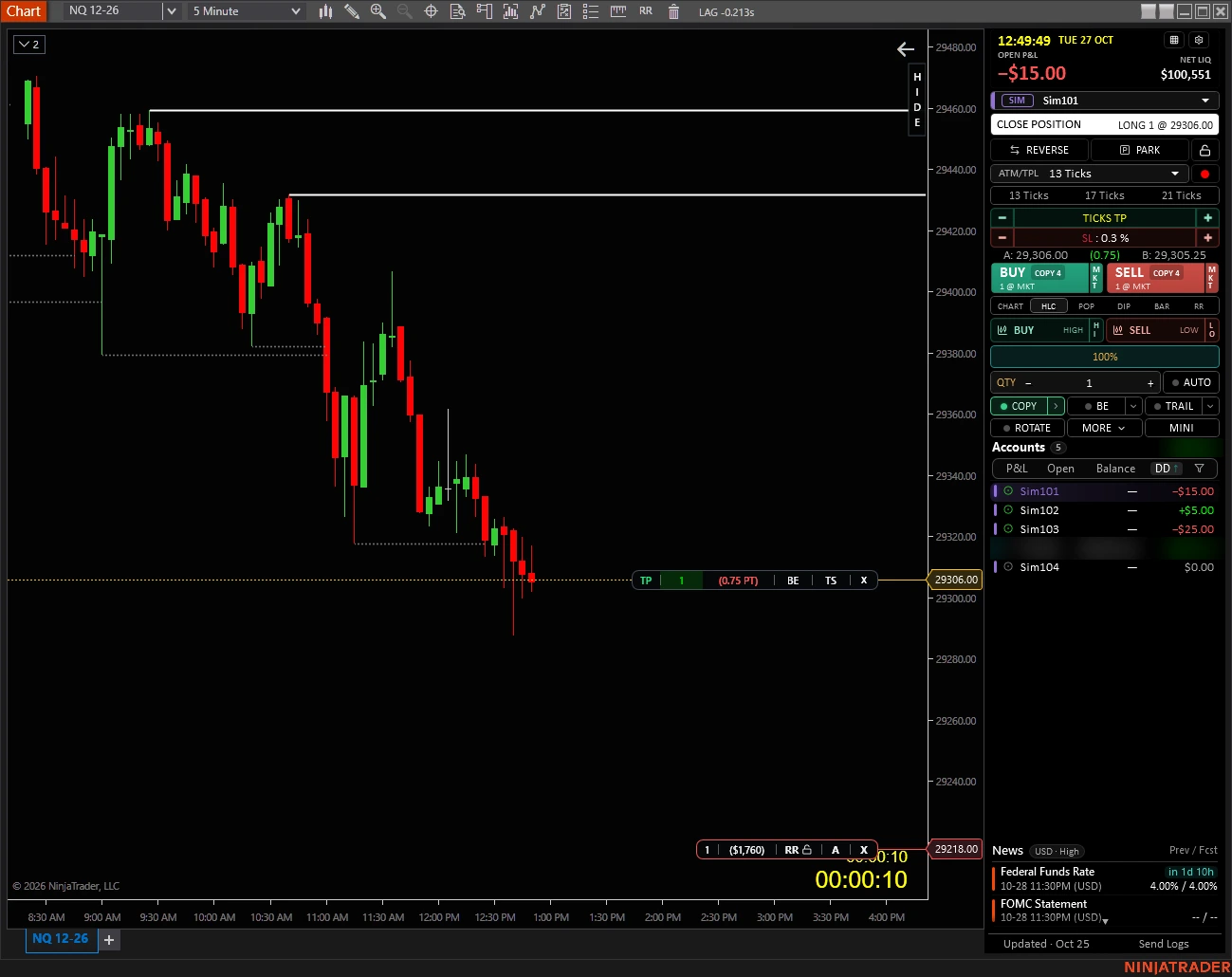
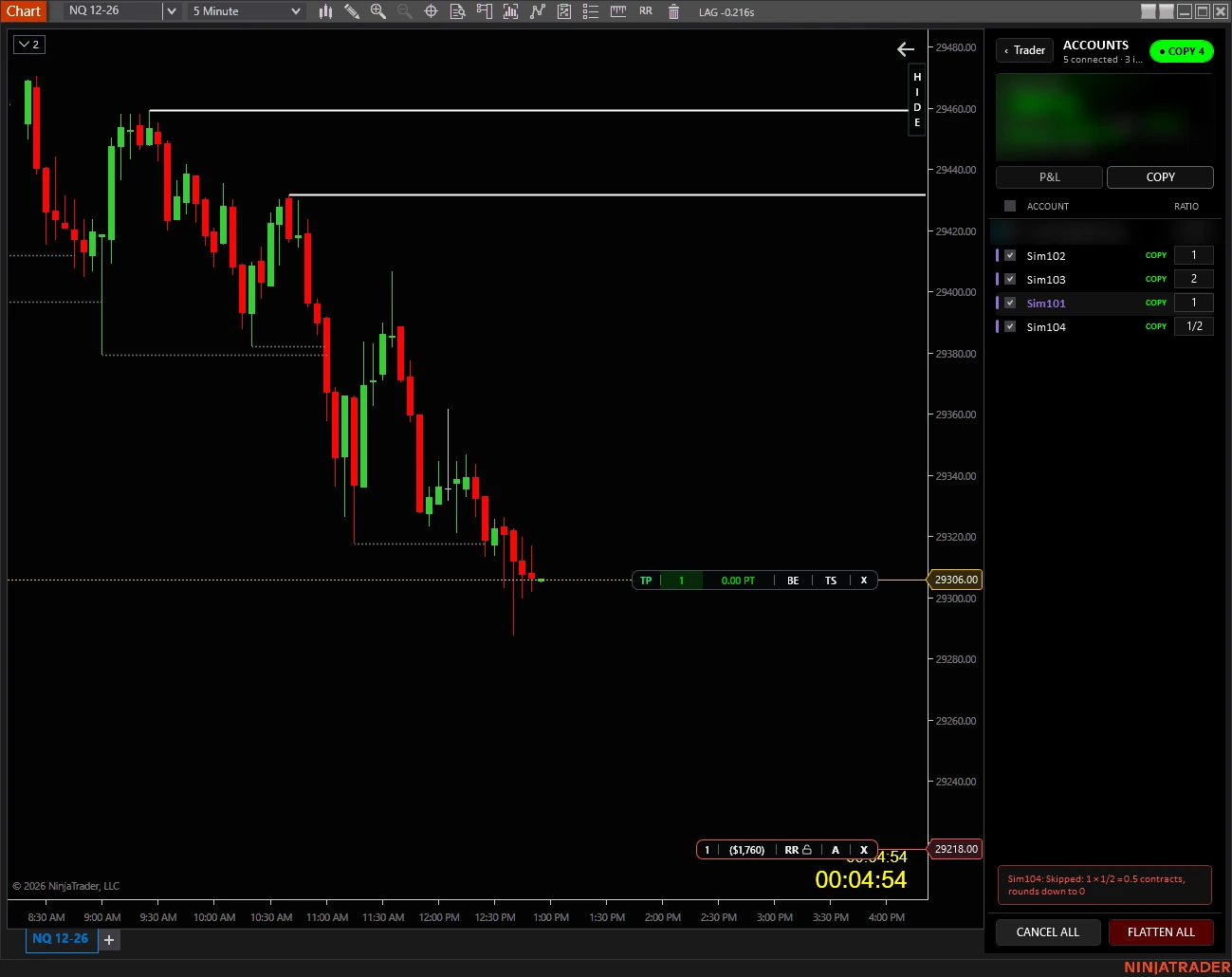
One copied trade, start to finish, on Sim accounts. Sim101 is the chart account. In the COPY tab, Sim102 is set to 1x, Sim103 to 2x and Sim104 to 1/2x. Then one press of BUY.
| Account | Ratio | Result | Its own stop |
|---|---|---|---|
| Sim101 (chart) | 1x | Long 1 @ 29,306.00 | 29,218.00 |
| Sim102 | 1x | Long 1 @ 29,305.00 | 29,217.00 |
| Sim103 | 2x | Long 2 @ 29,305.875 avg | 29,218.00 |
| Sim104 | 1/2x | Skipped: 0.5 contracts rounds down to 0 | None |
Things to notice:
- Fills can differ by a tick or more. Same click, three prices, because every account is filled on its own.
- Each stop is set from that account's own fill, at the same distance, not copied as one fixed price.
- A skipped account is named, with the reason. No silent failures.
- One close flattens the group. CLOSE POSITION on Sim101 closed all three copies and cancelled their stops, with no orders left behind.
- Rotation is locked out while COPY is on, so the two modes cannot run at once.
Which one should you pick?
A few of your own accounts, you only need copying
Nexus Copier Standard
Many accounts, or accounts on different brokers
Nexus Copier Pro
You also want chart order entry, sizing and loss locks
Nexus Chart Trader
You trade from several machines or outside NinjaTrader
A cloud copier
You want trades spread across accounts, not duplicated
Rotation, not a copier
Copying vs rotation
Copy trading
Every trade goes to all selected accounts at once. Five accounts, five positions.
Rotation
Each new trade goes to the next account in line. Five trades, spread across five accounts. Nexus Chart Trader calls this Smart Rotation.
Before you copy to funded accounts
Check firm rules
Firms differ on whether, and between which accounts, copying is allowed.
Match the contract
Every follower must have the same symbol and contract month available.
Test in Sim
Run an entry, a stop move, a partial exit and a flatten on Sim first.
Expect different fills
Each account fills on its own. Check every follower, not just the master.
Size on purpose
Doubling size doubles the loss too. Small ratios round down: 0.5x of one contract is skipped.
Watch for skips
A follower that is disconnected or loss-locked will not get the trade. That is usually why a copy "misses".
What prop firms say
Topstep: copying is allowed on Trading Combine and Express Funded accounts, and the lead account must have the lowest maximum position size.
Apex Trader Funding: copy trading across your own PA accounts is allowed, all accounts must trade the same direction (no hedging), and a household can hold at most 20 active PA accounts.
Take Profit Trader: you can copy your test accounts and up to 5 PRO accounts. Rules change, so check your firm's current wording. No copier certifies compliance.
The four options in more detail
1. NinjaTrader 8 on its own
The NinjaTrader 8 release notes up to 8.1.8 (July 2026) list no built-in copier or multi-account order entry, and NinjaTrader's prop platform page points to third-party copiers. What NT8 does give you is Multi-provider mode, which keeps several broker connections open at once so an add-on copier can reach accounts on each. Tradovate's group trading is a Tradovate platform feature, not part of NT8.
2. Local add-on copier
Nexus Copier runs inside NinjaTrader: pick a master and followers, and each master action (entry, exit, stop or target change) is sent to every follower. Standard ($20) covers up to 3 followers and 30 contracts each. Pro ($299) adds unlimited followers, up to 200 contracts, copying across brokers, account-type filters and follower groups with ratios. Both map minis to micros and are lifetime licenses.
Other local copiers include Replikanto (FlowBots, licensed per computer; check FlowBots for current pricing) and CrossTrade's copier, part of its Pro plan at $49 per month when we checked.
3. Copy trading in Nexus Chart Trader
In Nexus Chart Trader you tick accounts in the COPY tab and press COPY. Every action on your chart account then goes to the group: entries, adds, reversals, exits, cancels, stop and target moves, breakeven and trailing. Each account gets its own orders and protection, its own size ratio, and can sit on a different broker. Accounts that are disconnected, parked or loss-locked are skipped, and the panel shows why.
4. Cloud copiers
Cloud services copy through broker APIs from their own servers, so NinjaTrader can be closed. The trade-off is a monthly fee and handing account access to a third party. When we checked, Tradesyncer listed plans from $49 to $149 per month, and TradersPost (webhook signals to broker APIs) from about $42 per month billed yearly.
When not to buy Nexus Copier
If you need cloud relay, a mobile app, or copying outside NinjaTrader 8, it is the wrong tool. If you already own Nexus Chart Trader, its copy trading may be enough. If your firm does not allow copying, no tool changes that.
Related reading
Copy trades between your NinjaTrader accounts
Nexus Copier copies one master account to your followers, with mini/micro mapping and per-follower sizing, from $20 one-time.
See Nexus CopierNexus Indicator
Published by Nexus Indicator. For product, licensing, or setup questions, contact support.