Nexus Chart Trader Installation Guide.
Everything you need to get Nexus Chart Trader up and running on NinjaTrader 8.
Windows 11 Users
If Windows "Smart App Control" blocks the install, temporarily disable it in Windows Security > App & browser control.
Enable Multi-Provider
Crucial for prop firm trading and multi-account functionality.
- In NinjaTrader, go to Tools > Options.
- Under General, check the box for Multi-provider.
- Click OK and Restart NinjaTrader.
Machine ID Activation
Nexus uses remote Vendor Licensing. We need your unique Machine ID to activate your access.
Get Your ID
- Open NinjaTrader 8
- Help > About
- Copy the Machine ID
Send to Us
Email ID & Receipt to:
info@nexusindicator.com
Import the .zip File
Download the indicator file. Do not unzip or extract it.
- Go to Tools > Import > NinjaScript Add-On...
- Select the
.zipfile and click Open. - Click OK on the success popup and Restart NinjaTrader.
Don't stop here — Step 4 is critical!
Skipping this step is the #1 cause of issues. Nexus Chart Trader will not work correctly without it.
Disable Chart Interferences
Crucial step to prevent NinjaTrader's native UI from conflicting with Nexus.
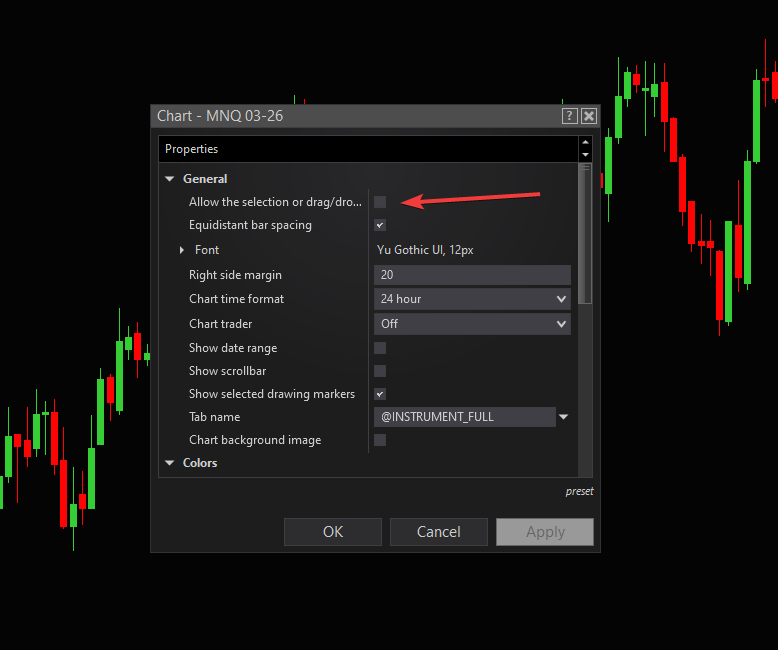
Disable Drag/Drop
Right-click chart > Properties. Uncheck Allow the selection or drag/drop...
Turn Off Native Chart Trader
In the top toolbar, toggle the "Chart Trader" icon to Off.
